Timelord: When Claude doesn't know what time (or day, or year) it is.

Tiny Claude skill provides temporal stability for my projects
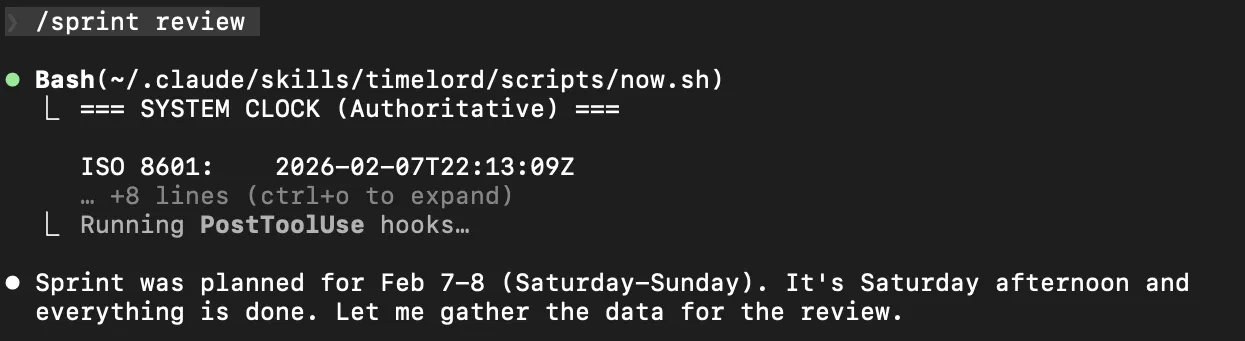
LLMs don’t know what time it is. They think they do, but they’re working from training data, session context that goes stale, or just plain guessing. I found this out the hard way when sprint reports and release notes started showing up with wrong years and “this week” references that were two weeks old.
So I built Timelord – a dead-simple Claude Code skill that does one thing: forces the AI to check the system clock before writing any date in a project management document.
It’s a 16-line bash script that outputs the authoritative time, and a skill description that tells Claude “never trust your memory for dates – verify first.” That’s it.
#!/bin/bash
# ~/.claude/skills/timelord/scripts/now.sh
echo "=== SYSTEM CLOCK (Authoritative) ==="
echo ""
echo "ISO 8601:    $(date -u +%Y-%m-%dT%H:%M:%SZ)"
echo "Local:       $(date '+%Y-%m-%d %H:%M:%S %Z')"
echo "Date:        $(date '+%Y-%m-%d')"
echo "Year:        $(date '+%Y')"
echo "Month:       $(date '+%B %Y')"
echo "Week:        $(date '+%V') (ISO week)"
echo "Day:         $(date '+%A, %B %d, %Y')"
echo ""
echo "Unix epoch:  $(date '+%s')"
When I run /sprint review, (or another project management command, the first thing Claude does is call now.sh to ground itself in reality. Then it correctly knows it’s Saturday afternoon, Feb 7, the sprint is complete, and it’s time to gather data for the review. No wrong years. No stale weeks. No “will deploy next week” on a doc from three weeks ago.
I’ve been using it across all production projects and it catches the kind of subtle date errors that would otherwise slip through and quietly corrupt your project timeline. The fix was embarrassingly simple, but that’s usually the best kind.
# ~/.claude/skills/timelord/SKILL.md (frontmatter)
name: timelord
description: "Temporal accuracy guardian for project documentation. ALWAYS use when:
  (1) Creating or editing project-management docs (sprints, status reports, release notes),
  (2) Writing dates that reference 'now', 'today', 'this week/month/year',
  (3) Calculating relative time ('2 weeks ago', 'last month'),
  (4) Any document with temporal references.
  Prevents year errors and date drift in documentation."